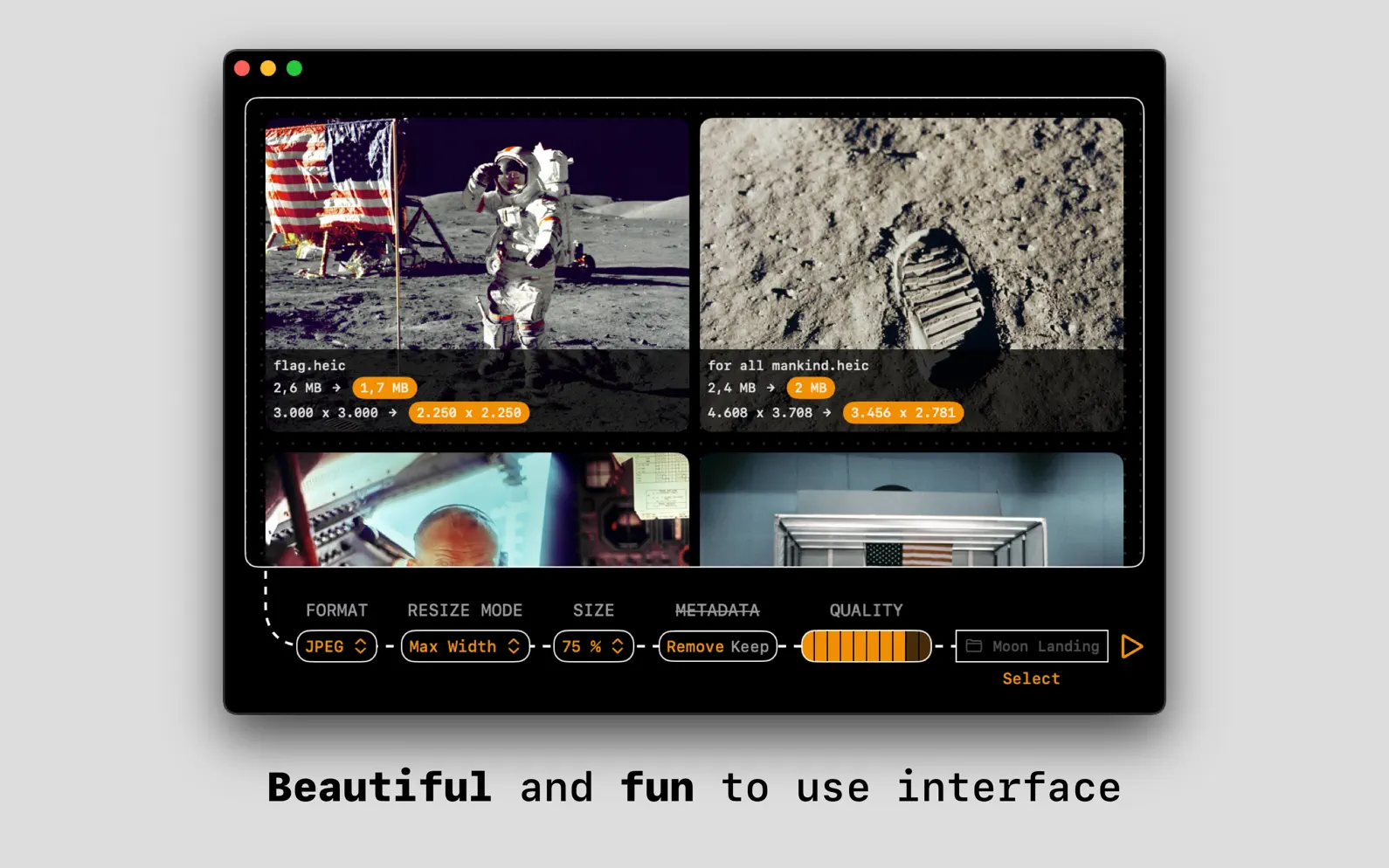
Convert, compress and resize photos on your Mac in seconds, fully offline. Drag and drop to convert between more than 50 image formats like HEIC, JPEG, PNG, WebP, AVIF, camera RAW, Photoshop files, and Windows and Mac icons. Works with HDR photos from iPhone and animated GIFs. For playfulness, it includes sound effects (optional), haptic feedback, and smooth animations. Need to quickly remove sensitive EXIF and other metadata, like location or device model, from your photos? Kompressor has your back. Just set Metadata to 'Remove'. Kompressor is optimized for performance and simplicity and can convert multiple images in batch mode. Just drag n' drop multiple images to get started. This app will automatically support new input image formats after every macOS update. FEATURE HIGHLIGHTS • Supports over 50 input formats and over 20 output formats • Fun and easy to use user interface with sound effects and haptic feedback • Quickly resize images • Preserve or remove EXIF data and other metadata for JPEG, TIFF, PNG and HEIC • Adjust compression quality for JPEG, WebP, AVIF, TIFF, PDF and HEIC • Works completely offline • Optimized for macOS 13+ • Optimized for Apple silicon Macs • Private by design. No analytics, no trackers. SUPPORTED INPUT IMAGE FORMATS Adobe Photoshop document (.psd) Adobe raw image (.dng) Apple icon image (.icns) ASTC textures (.astc) AV1 Image File Format (.avif) Canon CR2 raw image (.cr2) Canon CR3 raw image (.cr3) Canon CRW raw image (.crw) Canon TIF raw image (.tif) DDS textures (.dds) DxO raw image (.dxo) Epson raw image (.erf) Fuji raw image (.raf) GIF image (.gif) Hasselblad 3FR raw image (.3fr) Hasselblad FFF raw image (.fff) HEIF Image (.avci) HEIF Image (.heic) HEIF Image (.heif) HEIF Image Sequence (.heics) JPEG 2000 image (.jp2) JPEG image (.jpeg) JPEG XL (.jxl) Kodak raw image (.dcr) KTX textures (.ktx) Leaf raw image (.mos) Leica raw image (.raw) Leica raw image (.rwl) Minolta raw image (.mrw) Multiple Picture Object image (.mpo) Nikon NRW raw image (.nrw) Nikon raw image (.nef) Olympus OR raw image (.orf) Olympus raw image (.orf) Olympus SR raw image (.orf) OpenEXR image (.exr) Panasonic raw 2 image (.rw2) Panasonic raw image (.raw) Pentax raw image (.pef) Phase One raw image (.iiq) PNG image (.png) Portable Bitmap Format (.pbm) PVRTC Textures (.pvr) QuickDraw picture (.pict) Radiance (.pic) Samsung raw image (.srw) Silicon Graphics image (.sgi) Sony ARW raw image (.arw) Sony raw image (.srf) Sony SR2 raw image (.sr2) TGA image (.tga) TIFF image (.tiff) WebP Image (.webp) Windows BMP image (.bmp) Windows icon image (.ico) SUPPORTED OUTPUT IMAGE FORMATS Adobe Photoshop document (.psd) Apple icon image (.icns) ASTC textures (.astc) AV1 Image File Format (.avif) DDS textures (.dds) GIF image (.gif) HEIF Image (.heic) HEIF Image Sequence (.heics) JPEG 2000 image (.jp2) JPEG image (.jpeg) KTX textures (.ktx) OpenEXR image (.exr) PDF document (.pdf) PNG image (.png) Portable Bitmap Format (.pbm) PVRTC Textures (.pvr) TGA image (.tga) TIFF image (.tiff) WebP Image (.webp) Windows BMP image (.bmp) Windows icon image (.ico) DEVELOPMENT Kompressor is developed by Lucas, as an independent side-project. It's crafted with longevity in mind: working completely offline, with no user tracking or third-party dependencies. Updates to Kompressor are sporadic, but you can be sure each version has been built to last. SUPPORT / FEEDBACK / CONTACT If you need direct contact with the developer, you can send an email to xoxo@lucas.love. I welcome feedback and like to help with any problems. Terms of Use: https://www.apple.com/legal/internet-services/itunes/dev/stdeula/
| Size | 8.5 MB |
|---|---|
| Initial release | |
| Price | |
| Platforms | Mac |
| Languages | English, French, German, Indonesian, Italian, Japanese, Korean, Portuguese, and 4 more |
| Category | Photo & Video |
| Website | kompressor.app |
| Compatibility | |
|---|---|
| Mac | Requires macOS 13.0 or later. |
App's data is regularly updated.
Last update:
- Fixed WebP conversion of HDR photos from recent iPhones - Fixed the invisible background pattern on macOS 27