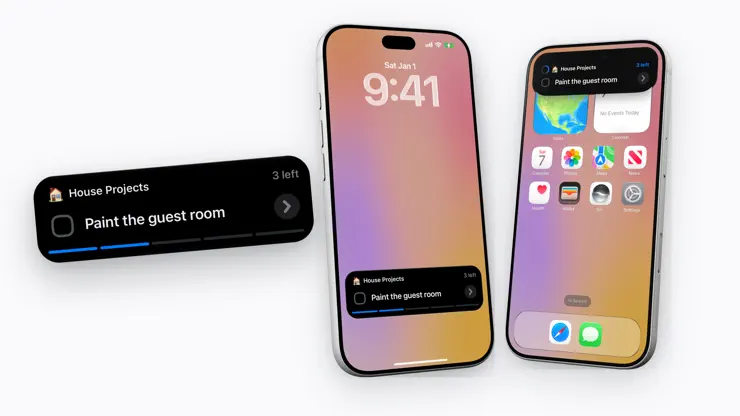


Stuff is built to help you organize your life and achieve your goals. Your Stuff can be as simple as a list of to-dos, or as complex as a system of interconnected lists, organized into spaces full of dependencies, deadlines, and carefully planned tasks. Stuff is designed to keep track of the dozens of to-dos that come to mind throughout the day, helping to clear your mind and turn thoughts into action. Dependencies: A Simple Yet Powerful System One of Stuff’s most unique and powerful features is Dependencies. Unlike other to-do apps, where tasks pile up into overwhelming lists, Stuff lets you link tasks together so that future steps stay out of sight until they’re relevant. This means that doers can brain-dump everything into Stuff without worrying about clutter, only the next actionable steps will be visible. Whether you’re planning a project, setting up routines, or just organizing weekend errands, Dependencies help keep Stuff clean, focused, and effortlessly powerful. Shared Lists: Collaborate Seamlessly Some tasks aren’t meant to be tackled alone. With Shared Lists, you can collaborate with teammates, classmates, family members, or anyone who needs to be in the loop. Assign tasks, track progress, and keep everyone on the same page, all within Stuff’s clean and intuitive interface. The Adventure Log: See Your Progress Over Time Every completed task tells a story, and with the Adventure Log, you can look back at everything you’ve accomplished. Filter by tag, space, or item type to see exactly what was done and when. Whether tracking work projects, study sessions, or personal growth, the Adventure Log helps you reflect on progress and stay motivated. The Today Card: Stay Focused, No Matter Where You Are Your most important tasks should always be front and center. The Today Card gives doers a snapshot of the day’s top priorities, no matter where they are in the app. With a quick tap, you can check your highest-priority tasks, see how much is left to do, and even glance at your Daily Note. Even if you’re bouncing between lists and organizing your week, the Today Card ensures that what matters most stays in view. Plan Ahead or Save for Later Sometimes, tasks don’t need to be done today, but they still matter. Stuff makes planning easy with Someday Tasks, allowing doers to set things aside without forgetting them. Assign a Deadline to separate when you plan to do something from when it has to be done. And for routine actions, repeating tasks keep everything on track automatically. Widgets: To-Dos at a Glance Stay on top of your tasks without even opening the app. Home screen widgets let doers see their lists instantly, making it easy to check off tasks, review deadlines, and stay on track throughout the day. Designed to Stay Open All Day Stuff is built to fit into your life, not disrupt it. Whether open on your desk while working or quickly pulled from your pocket while on the go, Stuff adapts to the way you work. The interface is designed to be both visually appealing and highly functional, keeping to-dos top of mind without being distracting. Built for Doers, Growing for the Future This is just the beginning! Stuff will continue to grow, with exciting new features on the roadmap designed to make productivity even more intuitive, effective, and enjoyable. Meet the Developer Stuff was built by me, Austin, an indie developer and a one-person team. I’ve always been passionate about productivity, but after trying countless apps, I couldn’t find one that truly fit my needs. I wanted something that combined a simple, beautiful interface with powerful features like Dependencies and repeating lists. So, I taught myself to code and started building Stuff, the to-do list of my dreams. Stuff uses Apple's Standard Licensing Agreement found here: https://www.apple.com/legal/internet-services/itunes/dev/stdeula/
Thank you for all of the feedback, Joe! Smaller Features - Onboarding is all new: meet Stuff by adding a few Tasks, then pick an Extra Stuff plan or skip - On Mac, right-click the Lightning Button or go to View › Lightning Button to choose what it does - Completed Tasks' notes can now be edited - Opening a Heading from Search or Quick Actions now takes you right to it - Tap the date tile on a Date view, or the star on Today, to jump to another day - Dragging Tasks, Headings, Lists, and Spaces into other apps now brings their details along in Stuff Markdown - Archiving and unarchiving Lists and Spaces is faster Design Updates - Focus's Live Activity now softly fades to the next Task instead of bouncing in - Long Heading names now wrap instead of cutting off - On Mac, Adventure Log rows lighten under the pointer - The Nebula and 80s app icons have been retired - Date views have a new header with a little calendar tile - The Hidden Toggle now lines up better with view titles - Dependencies are now called Blockers Blips - Fixed a blip where notifications allowed before making a profile never arrived - Fixed a blip where turning off notifications on one device stopped them on all your devices - Fixed a blip on Mac where the Lightning Button had a menu arrow and didn't match the other toolbar buttons - Fixed a blip where Tasks edited from the Adventure Log didn't show their notes icon there - Fixed a blip where changing a Shared List's teammates sometimes didn't save - Fixed a blip on Mac where Tasks in a List's Completed section couldn't be selected with a click or the arrow keys - Fixed a blip on Mac where Quick Planning a selected Task out of the view scrolled down to Just moved out - Fixed a blip where the app icon badge and Today Count widget could count one more than Today - Fixed a blip where the reordering click sound skipped or lagged when moving Tasks quickly - Fixed a blip on Mac where the add-task title didn't wrap while typing - Fixed a blip on Mac where Tasks couldn't be added to an existing Template - Fixed a blip where some app icons didn't match their previews with Dark or Tinted Home Screen icons - Fixed a blip where a Task dragged into another app left a blank placeholder behind and dropped an ID instead of its name - Fixed a blip on Mac where Siri sometimes didn't add a Task to the List it named - Fixed a blip where Lists in Today didn't show their Space - Fixed a blip where unarchiving a List put its completed Tasks in Queued - Fixed a blip on Mac where Archive sometimes opened empty - Fixed a blip where trashing Lists shared with you from a multi-selection skipped them instead of offering to leave them - Fixed a blip where trashing a shared List, including from the CLI, left it shared with its teammates - Fixed a blip where Empty Trash failed when it held Lists shared with you - Fixed a blip where tapping Tags while creating a Space didn't open Extra Stuff - Fixed a blip where undoing a new Blocker could take an extra Undo - Fixed a blip where the Shortcuts app showed duplicate Stuff actions, like four called Open Item - Fixed a blip where trashing a Task took a few seconds to remove it from the list - Fixed a security blip where Stuff's sync connection could be intercepted on an untrusted network - Fixed a blip where copied Tasks started with a stuff markdown indicator line - Fixed a blip on Mac where Stuff used lots of battery and CPU while idle when a deadline had passed (thanks, kidwhoseeghosts!) - Fixed a blip where new tasks didn't always start with a capital letter
| Size | 238 MB |
|---|---|
| Initial release | |
| Price | |
| Platforms | Mac, iPhone, and iPad |
| Languages | Danish, Dutch, English, Finnish, French, German, Italian, Norwegian Bokmål, and 3 more |
| Category | Productivity |
| Website | themitycompany.com |
| Compatibility | |
|---|---|
| iPhone | Requires iOS 26.0 or later. |
| iPad | Requires iPadOS 26.0 or later. |
| Mac | Requires macOS 26.0 or later and a Mac with Apple M1 chip or later. |
| Apple Vision | Requires visionOS 26.0 or later. |

Kanban Board, Planner & Widget
Repeat Routine Task List Maker
Tasks, habits and reminders
Visual Calendar & Organizer

Task Manager, Lists, Organizer

Daily & Hourly Time Blocking
LaTeX, Markdown flash cards
AdApp's data is regularly updated.
Last update:

