

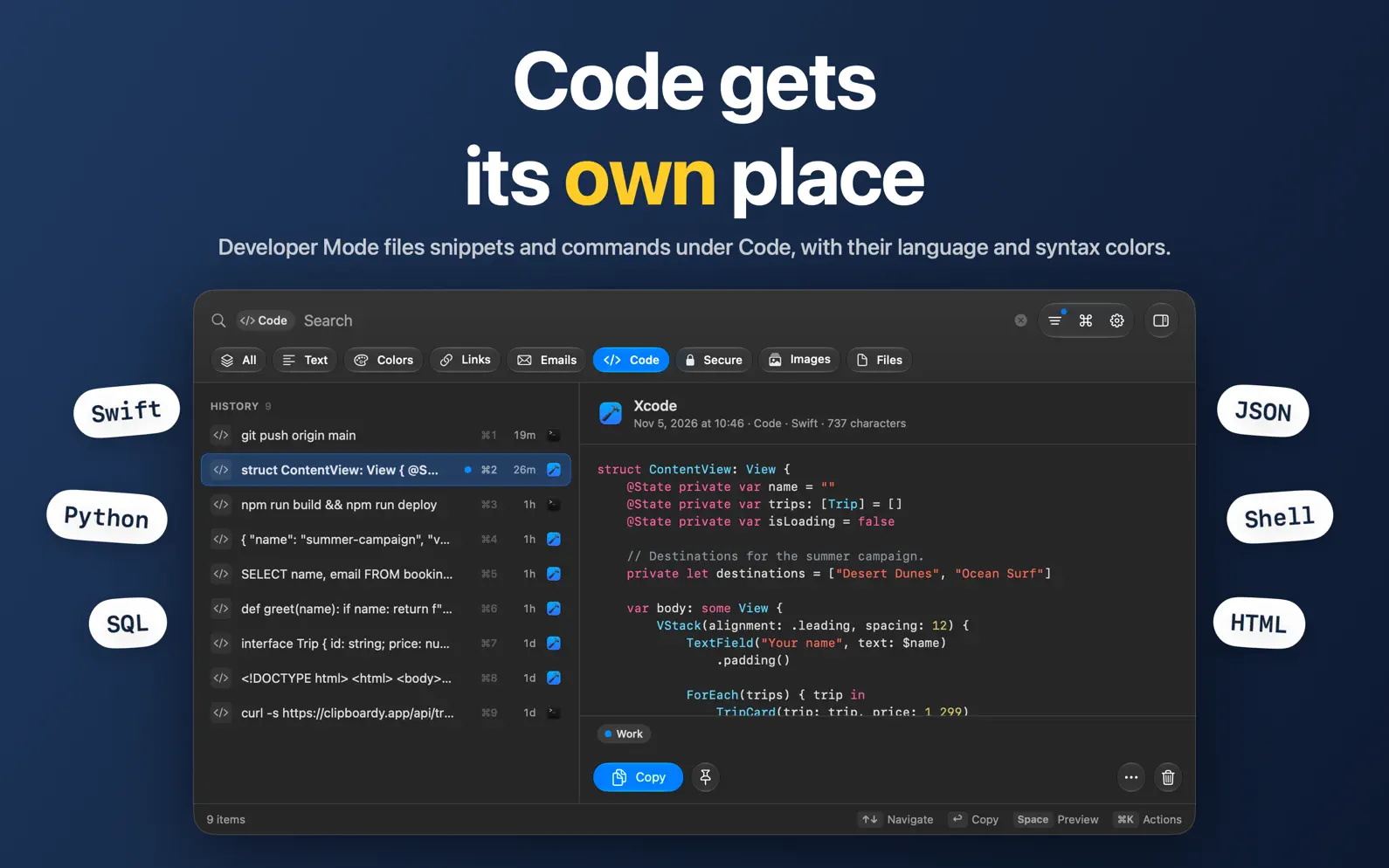

ClipBoardy is a fast, private clipboard manager for macOS that keeps everything you copy exactly where you need it, ready instantly without breaking your focus. Whether it's text, links, images, files or code, ClipBoardy remembers what you copy so you can search it, reuse it and move on. BUILT FOR SPEED AND SIMPLICITY ClipBoardy lives quietly in your menu bar. Press ⇧⌘V, start typing, press Return to copy, then paste anywhere with ⌘V. No bulky windows, no complicated workflows. FIND ANYTHING INSTANTLY • Search your history as you type • Filter by type: text, code, colors, links, emails, images and files • Search shortcuts like is:image and date:today, plus app:Safari and tag:work with Pro • Pin favorites, preview anything with Space, and press ⌘K for every action • Copy recent items with ⌘1–⌘3, or ⌘1–⌘9 with Pro • Recent and pinned items are a right-click away in the menu bar ORGANIZE AND EDIT • Edit any item in place, and revert to the original at any time • Deleted items go to a Trash you can restore from • Name items and color-code them with tags (Pro) • Copy several items together, in the order you pick them (Pro) • Text tools: remove tracking from links, plus change case, format JSON and encode URLs with Pro DEVELOPER MODE Built for technical workflows: • Code and terminal commands get their own Code type • Labels each snippet with its language, shown in a monospaced preview • Turn it on in Settings whenever you need it PRIVACY YOU CAN TRUST Your history stays on your Mac and is encrypted with a key kept in your Keychain. • No accounts • No cloud syncing • No tracking or analytics • No data collection • Pause Saving any time, and choose apps whose copies are never saved • Password managers are ignored automatically • Export an encrypted, password-protected backup whenever you like SECURE SENSITIVE CONTENT • Protect items with your Mac password or Touch ID • Remove one-time codes and secure items automatically after a set time SEARCH INSIDE IMAGES (PRO) Find screenshots and photos by the words in them. Text is read privately on your Mac; nothing is uploaded. FREE, WITH PRO WHEN YOU WANT MORE ClipBoardy is free to download, with unlimited capture, encryption, search, editing, the Trash and 5 pins. Free keeps up to 6 months of history and shows your last 30 days or 500 items, whichever is more. Older items stay saved, and searches show when they match. ClipBoardy Pro is a one-time purchase that shows your whole history, keeps it longer, and adds tags, unlimited pins, search inside images, text tools, copying several items at once, Shortcuts actions and a custom shortcut. Pro for Family shares it with up to five family members. No subscriptions. If you bought ClipBoardy before, Pro is included at no cost. WHY CLIPBOARDY? Most clipboard apps try to do too much. ClipBoardy focuses on doing one thing exceptionally well: making copy and paste effortless.
A new icon, easier-to-read code, and a history window that's quicker to use from the keyboard. • A new app icon: a yellow Mac key, or a dark key in dark mode. • Syntax highlighting in Developer Mode: code is now colored in previews and the editor, for Swift, Python, JavaScript, TypeScript, JSON, SQL, HTML, XML and Shell. • Large code items now open and scroll smoothly. • Filter code by language with search shortcuts like code:Swift (Pro). • Keyboard focus now moves between search and the list, with a new cheat sheet of keyboard shortcuts. • ⇧-click now selects a range from a fixed starting point. • Tag several items at once (Pro), and the actions button stays available while several items are selected. • Copy Email Address for mailto: items gives you the address without "mailto:". • Opening the Trash now shows everything in it, and leaving brings back your history filters. • Clearer buttons in the editor and its save prompt, plus a tidier header and search field.
| Size | 5.5 MB |
|---|---|
| Initial release | |
| Price | |
| Platforms | Mac |
| Languages | English |
| Category | Productivity |
| Website | clipboardy.app |
| Compatibility | |
|---|---|
| Mac | Requires macOS 14.0 or later. |
LaTeX, Markdown flash cards
AdApp's data is regularly updated.
Last update:

Copy, Search, Manage, Share
Current clipboard and history

Copy Paste Keyboard History

A simple clipboard manager.

Your Copy & Paste History

Clipboard manager. No fluff.