
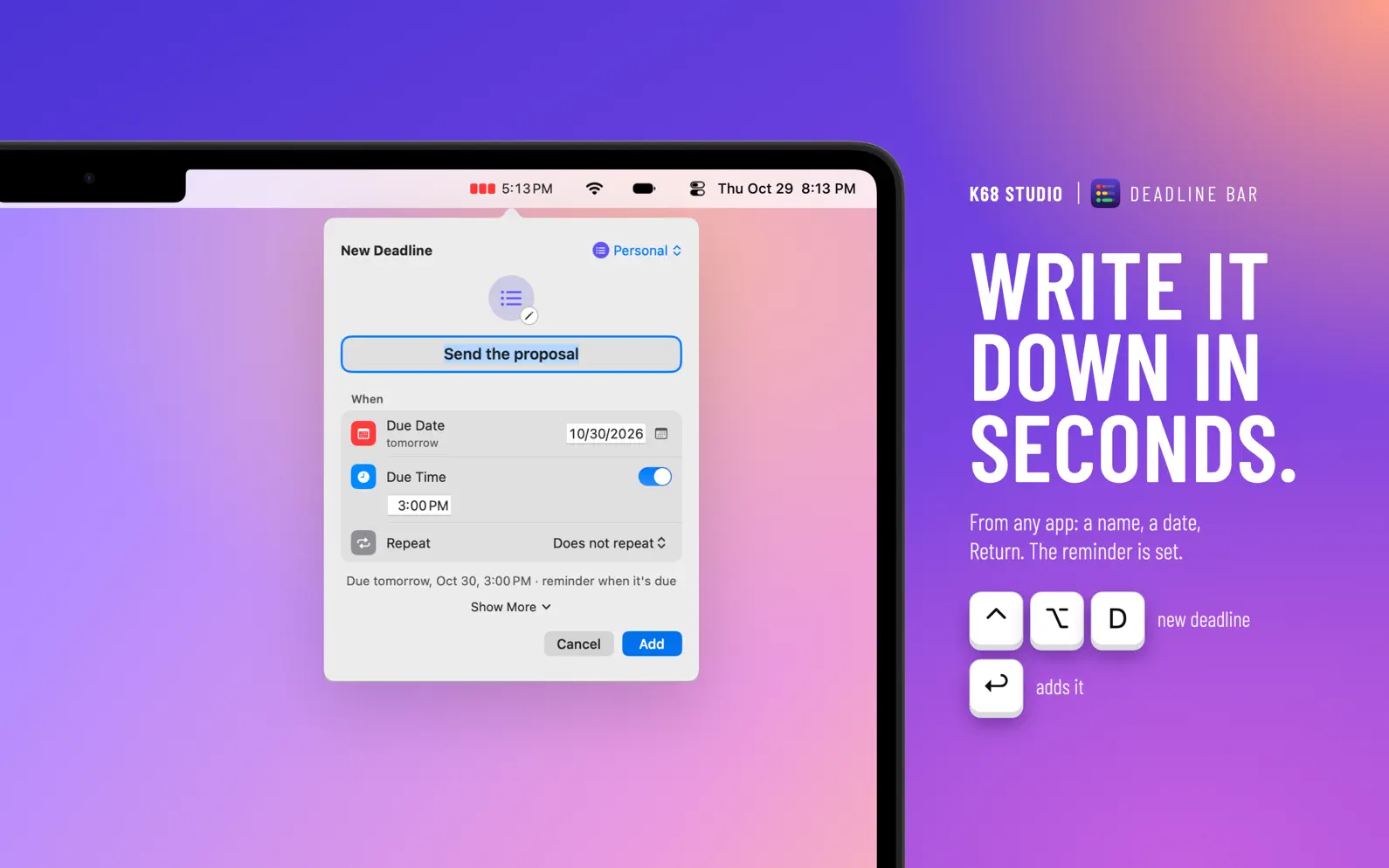


Deadline Bar keeps every deadline, bill and renewal in your menu bar, and helps you finish them, not just see them coming. WRITE IT DOWN IN SECONDS Press ⌃⌥D in any app (or a shortcut of your own), type a name, pick a day, and it's saved. A time and a repeat are one click away; Show More opens the reminder, priority, start, notes and link in the same form. SEE WHAT'S DUE The most urgent deadline and its time left sit in the menu bar. Each bar turns green, then yellow, then red as its own time runs out, so a two-week project and a one-hour task read the same way. Press ⌘F to find any deadline by its title, notes or group. DO THE RIGHT THING NEXT Sorted by urgency: overdue first, then red, yellow and green; within each, the nearest day first, and on the same day, high priority first. Each deadline can also say when it turns urgent. What to start is already decided. Not this week? Postpone it 1 week from the list or from its notification. FOCUS UNTIL IT'S DONE Start a timed session on any task: 25 or 50 minutes, 1 hour or until it's due, with a 10-minute break after each 50 minutes and a small floating timer. Pro adds your own length and rhythm of breaks. Other countdowns and reminders continue as usual. BILLS AND RENEWALS COME BACK BY THEMSELVES Monthly rent, a yearly domain, a quarterly report: repeats keep their day and remind you before. A yearly renewal can stay out of sight until a week before it's due. A weekday task due at 9:00 AM can wait until 7:00 each morning. Give a group an Early Reminder, and every new deadline in it starts with that reminder. WORK FROM THE KEYBOARD Move through the list with the arrow keys, open a deadline with Return or Space, and mark it done with ⇧⌘C. Select several with ⌘-click or ⇧-click, then mark them done or delete them in one step; one Undo takes it back. MAKE IT YOURS Built-in groups for subscriptions, bills, work and study, each with its own fields: a subscription asks its price, in its own currency, and each group shows what it costs a month. Three themes come with the app: System, Graphite and Midnight Navy. Three Pro themes, Violet Dusk, Cream Paper and Lilac Frost, give the panel a ground of its own; try any of them for three minutes before you decide. Every theme follows your Mac's light or dark appearance. Two text sizes, four menu bar styles. REMINDERS AND CALENDAR (PRO) See your dated reminders and chosen calendars among your deadlines. Mark a one-off reminder done here and it's completed in Reminders. PRIVATE BY DESIGN No account, no server. Your deadlines never leave your Mac. Export and import them any time. WHAT'S THE CATCH? Free stays free: five open deadlines at a time (scheduled ones count; marking one Done frees its place), with no time limit and no trial clock. • No account to make • No ads • No tracking, no analytics • Nothing to unlock for the basics: repeats, reminders, start dates, Focus, search and the urgency order are free Pro is for more: unlimited deadlines, your own groups, Reminders and Calendar in the list, and Focus of any length and rhythm. FREE AND PRO Free: 5 deadlines, the built-in groups, repeats, reminders, start dates, Focus sessions with breaks, Quick Add, search, the urgency order and three themes. Pro: unlimited deadlines, groups of your own, group defaults, Reminders and Calendar in the list, any Focus length and rhythm, and the three Pro themes. Pro comes yearly with a free trial, or as a one-time purchase that's yours to keep; the App Store shows each price in your currency. Subscriptions renew until you cancel in the App Store. Requires macOS 14 Sonoma or later. Terms of Use: https://www.apple.com/legal/internet-services/itunes/dev/stdeula/ Privacy: https://deadlinebar.app/privacy
Clearer at a glance, quicker to set a time. • A short task turns red in its last hour, so nothing due soon looks calm. • Late and break times in the menu bar are easier to read. • Turning on Due Time starts at the next hour, not 9:00 in the morning. • The deadline list no longer shows a scroll bar when you use a mouse. • Start Pro on either plan by November 18 and become a Founding Supporter, engraved on your Pro card for good. • Other fixes and improvements.
| Size | 3 MB |
|---|---|
| Initial release | |
| Price | |
| Platforms | Mac |
| Languages | English |
| Category | Productivity |
| Website | deadlinebar.app |
| Compatibility | |
|---|---|
| Mac | Requires macOS 14.0 or later and a Mac with Apple M1 chip or later. |

Tasks, habits and reminders
Visual task timer, day planner

Change events by typing

Daily & Hourly Time Blocking

Kanban Board, Planner & Widget
Count down to what matters
LaTeX, Markdown flash cards
AdApp's data is regularly updated.
Last update:


